2.2 基于Apifox工具构建聊天对话#
学习目标#
- 掌握Apifox工具的安装
- 能够基于Apifox工具搭建聊天对话
一、Apifox介绍#
Apifox 是一款集成了 API 文档、API 调试、API Mock、API 自动化测试于一体的协同工作平台 。它的目标是成为 API 开发、测试、运维整个生命周期中的“一站式”解决方案。 你可以把它理解为:
- Postman + Swagger + Mock.js + JMeter 的强大组合。
- 它的核心理念是 “API 优先” ,通过一套系统、一份数据,解决多个工具之间数据同步的难题。
二、Apifox安装#
三、导入ollama的Api#
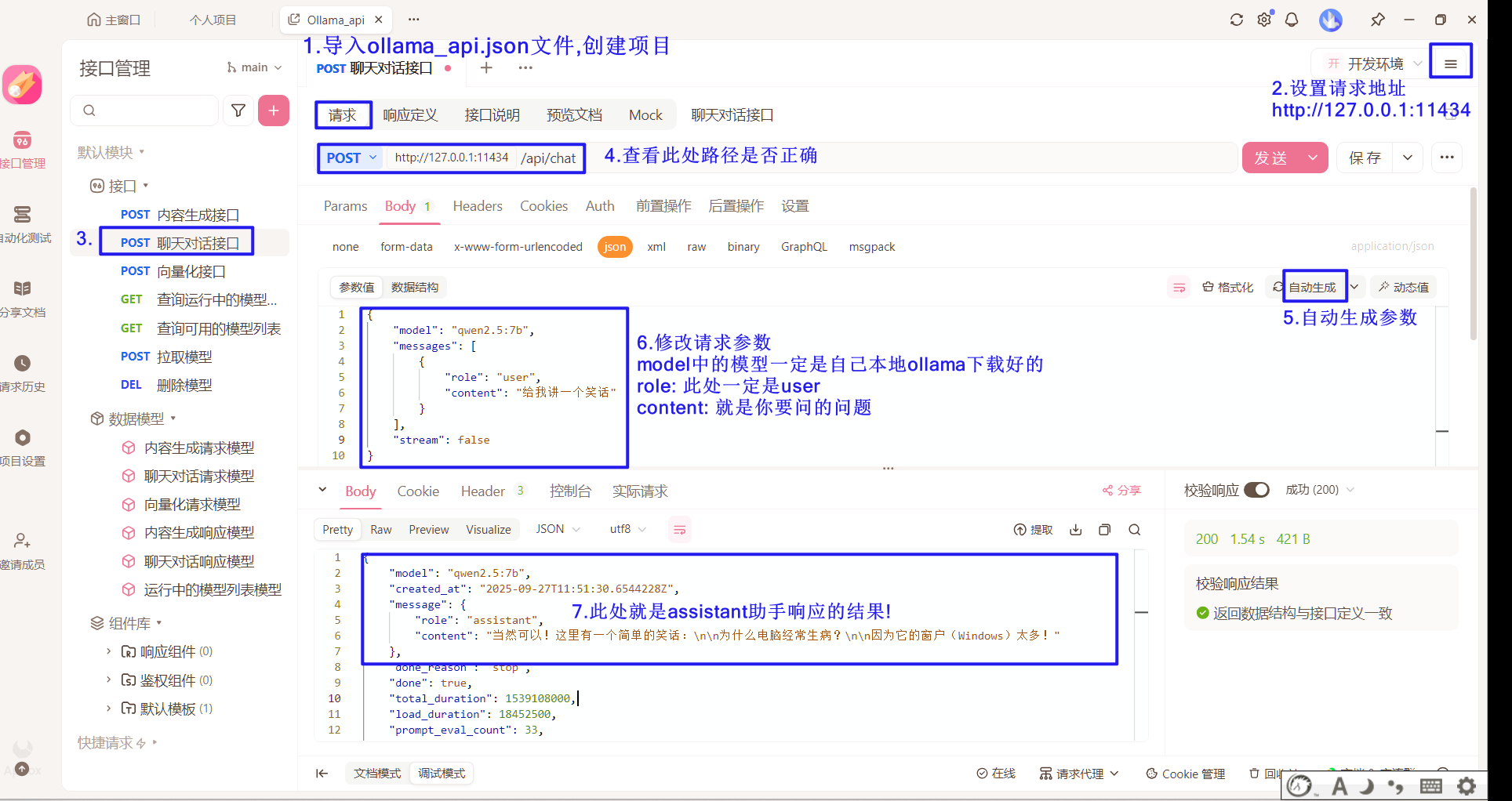
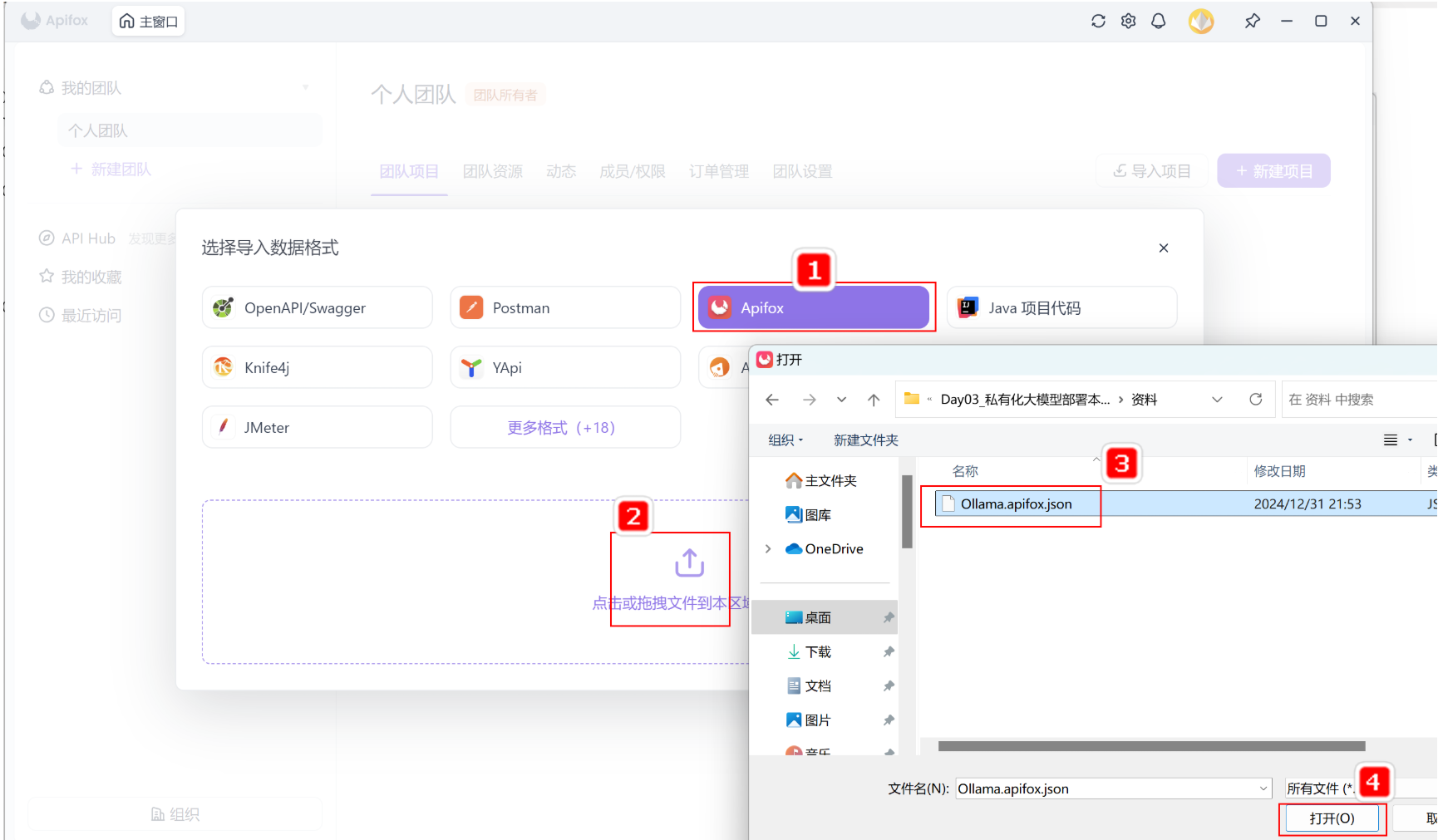
为了方便后续使用程序接入Ollama中的大模型,在此可以先通过Apifox进行Api的快速体验与学习。在资料文件夹中《Ollama.apifox.json》文件提供了供Apifox软件导入的json内容,再此我们先导入到Apifox软件中,快速体验一下API相关功能。
Oallma支持的API可以在资料文件夹中通过《Ollama API文档.html》了解详解,双击打开查看:
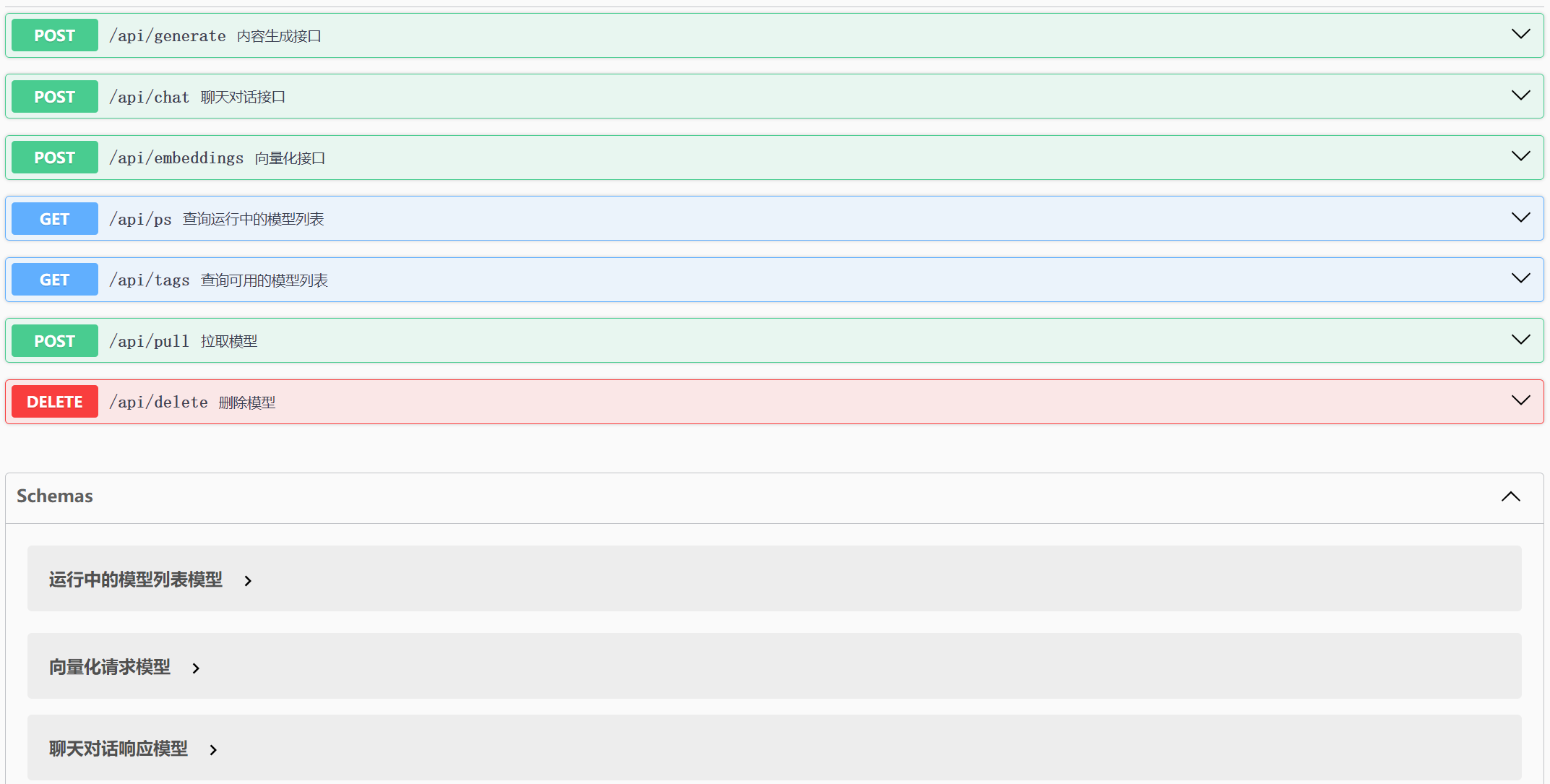 通过网页可以了解到Ollama支持7个API (这里只列举了常用的),接下来我们重点先了解对话和向量化接口,因为这两个接口是最重要的,其它接口则留给大家课后自行尝试,但是在正式体验之前,需要先配置一下环境地址。
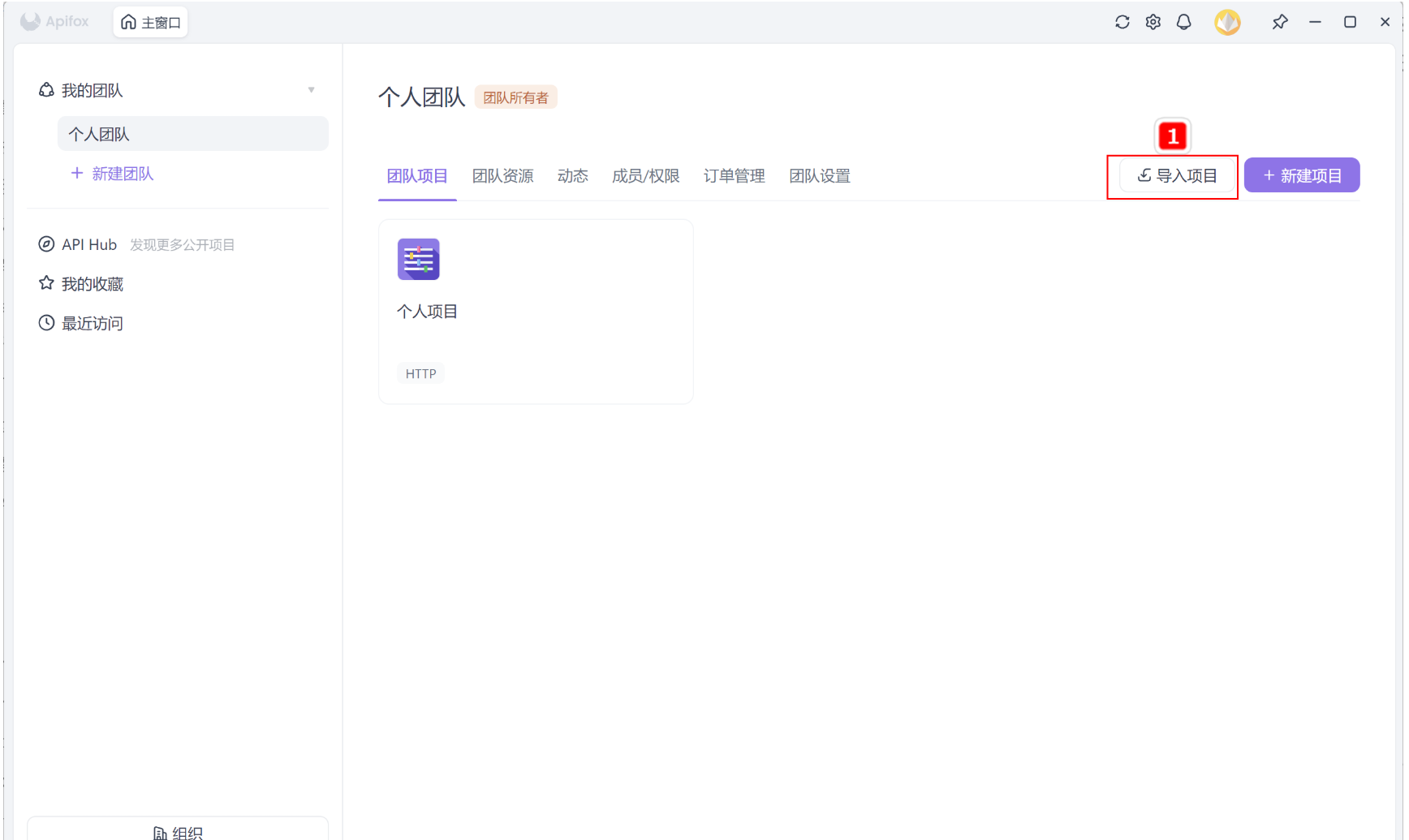
Step 1:打开导入项目
通过网页可以了解到Ollama支持7个API (这里只列举了常用的),接下来我们重点先了解对话和向量化接口,因为这两个接口是最重要的,其它接口则留给大家课后自行尝试,但是在正式体验之前,需要先配置一下环境地址。
Step 1:打开导入项目
 Step 2:选择导入的文件
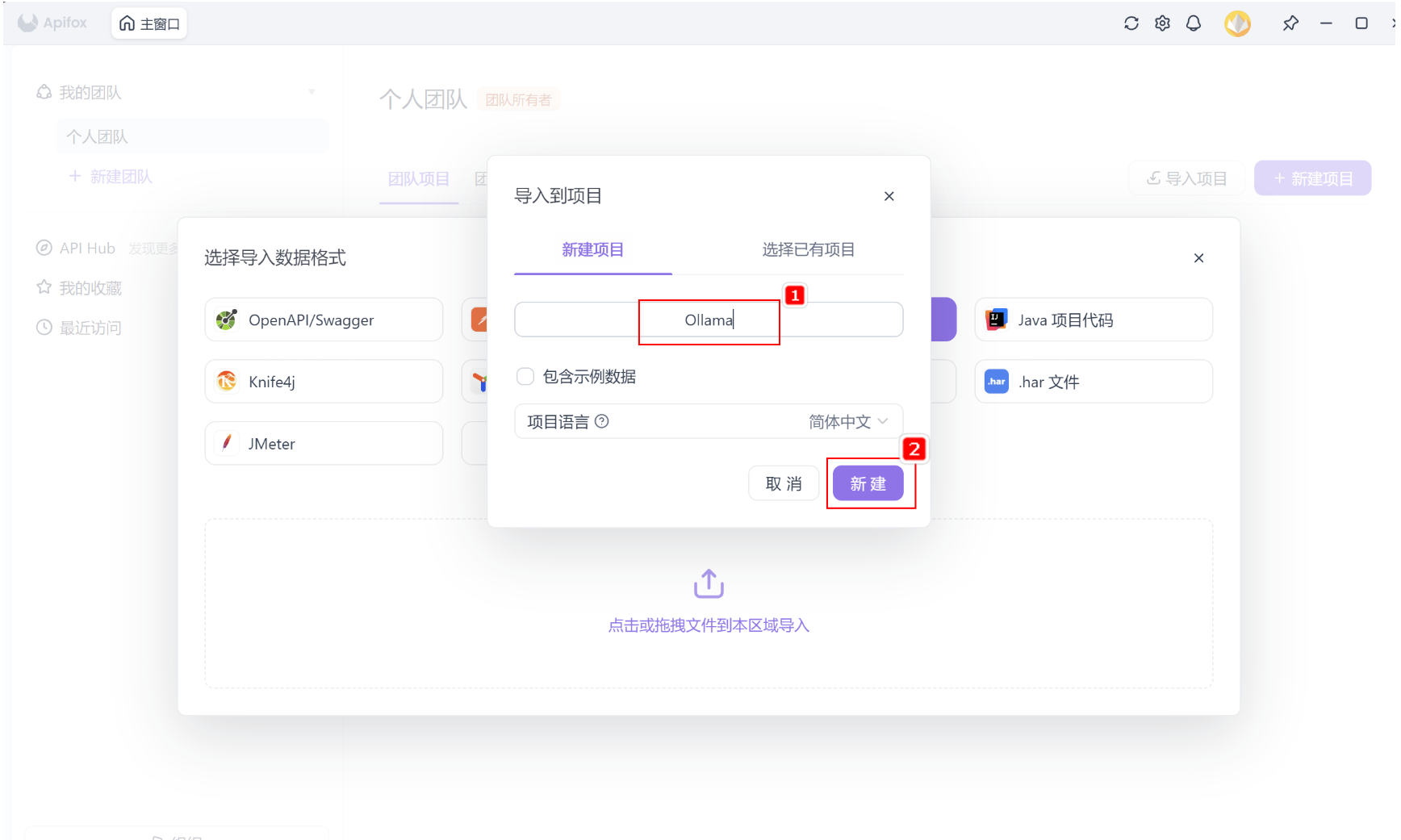
 Step 3:输入项目名称
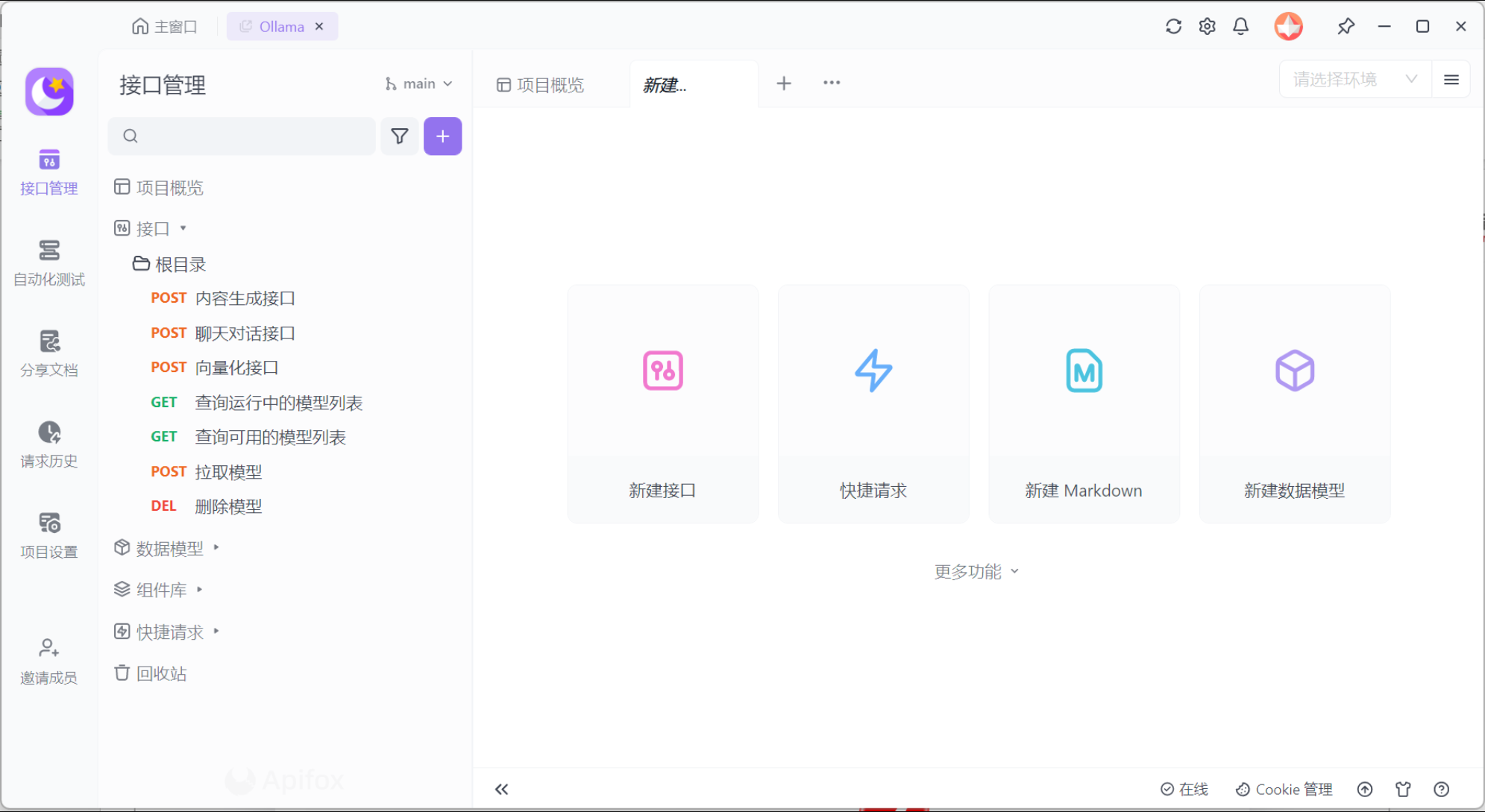
 Step 4:完成导入,进入项目
中间如果有导入预览,则直接点击确定即可。
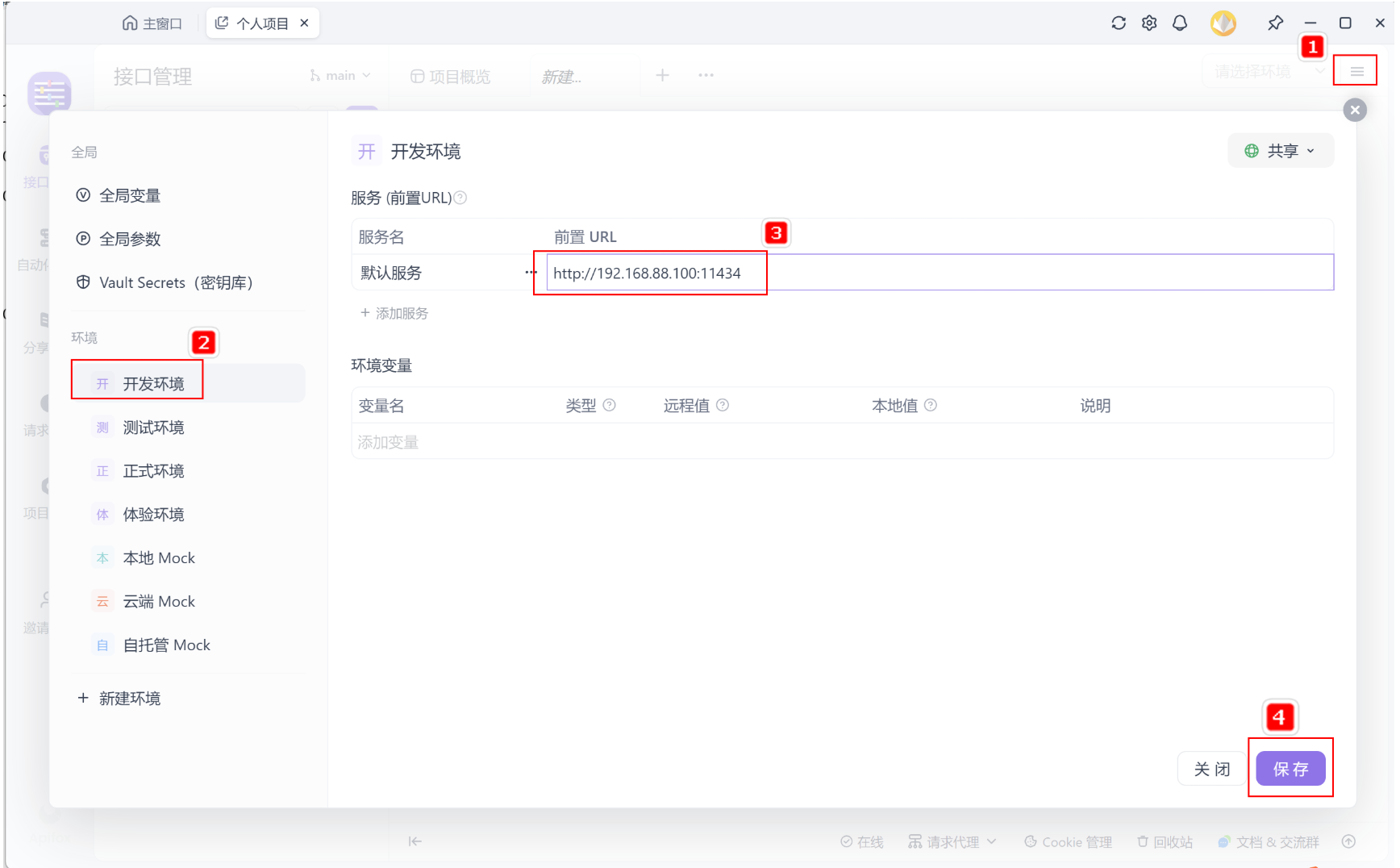
四、Apifox集成Ollama#
本地url: http://127.0.0.1:11434
远程虚拟机url: http://虚拟机ip地址:11434
五、聊天对话接口说明#
聊天对话接口,是实现类似ChatGPT、文心、通义千问等网页对话功能的关键接口,请求的地址与参数如下:
POST /api/chat
    {
      "model": "qwen2.5:0.5b",
      "messages": [
        {
          "role": "string",
          "content": "string",
          "images": "string"
        }
      ],
      "format": "string",
      "stream": true,

    }
- 请求参数
| 名称 | 位置 | 类型 | 必选 | 中文名 | 说明 |
|---|---|---|---|---|---|
| body | body | object | 否 | none | |
| model | body | string | 是 | 模型名称 | none |
| messages | body | [object] | 是 | 聊天消息 | none |
| role | body | string | 是 | 角色 | system、user或assistant |
| content | body | string | 是 | 内容 | none |
| images | body | string | 否 | 图像 | none |
| format | body | string | 否 | 响应格式 | none |
| stream | body | boolean | 否 | 是否流式生成 | none |
| keep_alive | body | string | 否 | 模型内存保持时间 | 5m |
| tools | body | [object] | 否 | 工具 | |
| options | body | object | 否 | 配置参数 | none |
| seed | body | integer | 否 | 生成种子 | none |
| top_k | body | integer | 否 | 多样度 | 越高越多样,默认40 |
| top_p | body | number | 否 | 保守度 | 越低越保守,默认0.9 |
| repeat_last_n | body | integer | 否 | 防重复回顾距离 | 默认: 64, 0 = 禁用, -1 = num_ctx |
| temperature | body | number | 否 | 温度值 | 越高创造性越强,默认0.8 |
| repeat_penalty | body | number | 否 | 重复惩罚强度 | 越高惩罚越强,默认1.1 |
| stop | body | [string] | 是 | 停止词 | none |
返回示例
    {
        "model": "llama3.1",
        "created_at": "2024-09-07T09:00:57.035084368Z",
        "message": {
            "role": "assistant",
            "content": "",
            "tool_calls": [
                {
                    "function": {
                        "name": "get_current_weather",
                        "arguments": {
                            "format": "celsius",
                            "location": "Paris"
                        }
                    }
                }
            ]
        },
        "done_reason": "stop",
        "done": true,
        "total_duration": 14452649821,
        "load_duration": 21370256,
        "prompt_eval_count": 213,
        "prompt_eval_duration": 11306354000,
        "eval_count": 25,
        "eval_duration": 3082983000
    }
- 返回结果
| 状态码 | 状态码含义 | 说明 | 数据模型 |
|---|---|---|---|
| 200 | OK | 成功 | Inline |
- 返回数据结构
状态码 200 时才返回以下信息。
| 名称 | 类型 | 必选 | 约束 | 中文名 | 说明 |
|---|---|---|---|---|---|
| model | string | true | none | 模型 | none |
| created_at | string | true | none | 响应时间 | none |
| message | object | true | none | 响应内容 | none |
| role | string | true | none | 角色 | none |
| content | string | true | none | 内容 | none |
| tool_calls | [object] | false | none | 调用的工具集 | |
| done | boolean | false | none | none | |
| total_duration | integer | false | none | 总耗时 | none |
| load_duration | integer | false | none | 模型加载耗时 | none |
| prompt_eval_count | integer | false | none | 提示词token消耗数 | none |
| prompt_eval_duration | integer | false | none | 提示词耗时 | none |
| eval_count | integer | false | none | 响应token消耗数 | none |
| eval_duration | integer | false | none | 响应耗时 | none |
六、聊天对话示例#